

How Credits Work
With Extend, your cost depends on what you run (e.g. Parse, Classify, Split, Extract, Edit Runs, Form Detection), how you run them (e.g. Performance vs. Light modes), and your plan’s credit rate (Pay as you go, Scale, or Enterprise).
Instead of fixed fees, you only pay for the specific processors you need, at the level of performance you require.
- Credits are Extend’s universal billing unit.
- Each action (parse, classify, extract, split, edit, form detection) consumes a base amount of credits per page, with optional surcharges for advanced features.
- Your plan determines the cost per credit, and plans with higher volumes get cheaper per-page pricing.
- You stay in control with alerts, top-ups, and real-time dashboards.
🧾 Base Pricing (Performance)
🧾 Base Pricing (Light)
🧾 Base Pricing (Auto Parsing)
The Auto parse engine (parse_auto) routes work per page: simple pages are parsed with the lightweight pipeline while complex pages get performance-level treatment. Each page is billed by the complexity of work it required:
The per-tier charges are itemized on the run response in usage.breakdown, including which pages fell into each tier:
🤖 ** Parse runs automatically when Extract, Split, or Classify processors are used.
💡 Edit pricing:
- Edit Filling (
/edit) costs 1 credit per page. If no schema is passed to Edit Filling, it runs Form Detection and both charges will apply (so 3 total credits per page). If you provide a schema, only the Edit Filling charges apply (1 credit per page). - Form Detection (
/detect_formor/form_detection_runs) costs 2 credits per page. The deprecated/edit_schemas/generateendpoint uses the same rate.
🔧 Optional Surcharges & Multipliers
The following optional features add surcharges on top of the base credit rates when enabled.
Review Agent
The Review Agent automatically flags results for quality assurance and adds a more reliable confidence score. It is available for both extraction and classification processors.
Agentic Corrections (Parsing)
When enabled, agentic correction features use a vision language model (VLM) to review and correct OCR results during parsing.
Note: When enabled for a document, agentic corrections only applies/charges for pages where the agentic correction was triggered (e.g. low confidence text blocks, tables, etc.).
Priority Parsing
Priority parsing guarantees faster p90+ parse results on the light parsing pipeline. Reach out to the Extend team if you need to enable this for your account.
Array Strategy Multiplier (Extraction)
Large Array Max Context does multiple passes through the entire document to maximize accuracy for complex array extraction, doubling the base extraction credit cost.
Advanced Excel Parsing
Advanced Excel parsing uses LLM-based layout detection for better table separation and header recognition in complex spreadsheets. Billed per cell rather than per page. Does not include empty cells.
Example Scenario:
💡 Formula: base credits per page × your plan's per-credit rate = $/page (plus any applicable surcharges)
-
Processing a 10-page document through a Splitting & Extraction workflow on Performance mode, would consume 70 credits in total, itemized as follows:
- 20 credits for parsing (10 pages * 2 credits)
- 20 credits for splitting (10 pages * 2 credits)
- 30 credits for extraction (10 pages * 3 credits)
-
If the same extraction run also has the Review Agent enabled, it would add 10 credits (10 pages * 1 credit), for a total of 80 credits.
-
If the parsing step used the race pipeline strategy and had agentic text correction trigger on 5 pages and agentic table correction trigger on 3 pages, parsing would cost 48 credits (10 * 2 * 2 for race + 5 * 1 for text correction + 3 * 1 for table correction) instead of 20.
Previewing and inspecting costs
Extend gives you visibility into credit usage at every stage — while you’re configuring a processor, after each run completes, and across your account over time.
In the config builder (before you run)
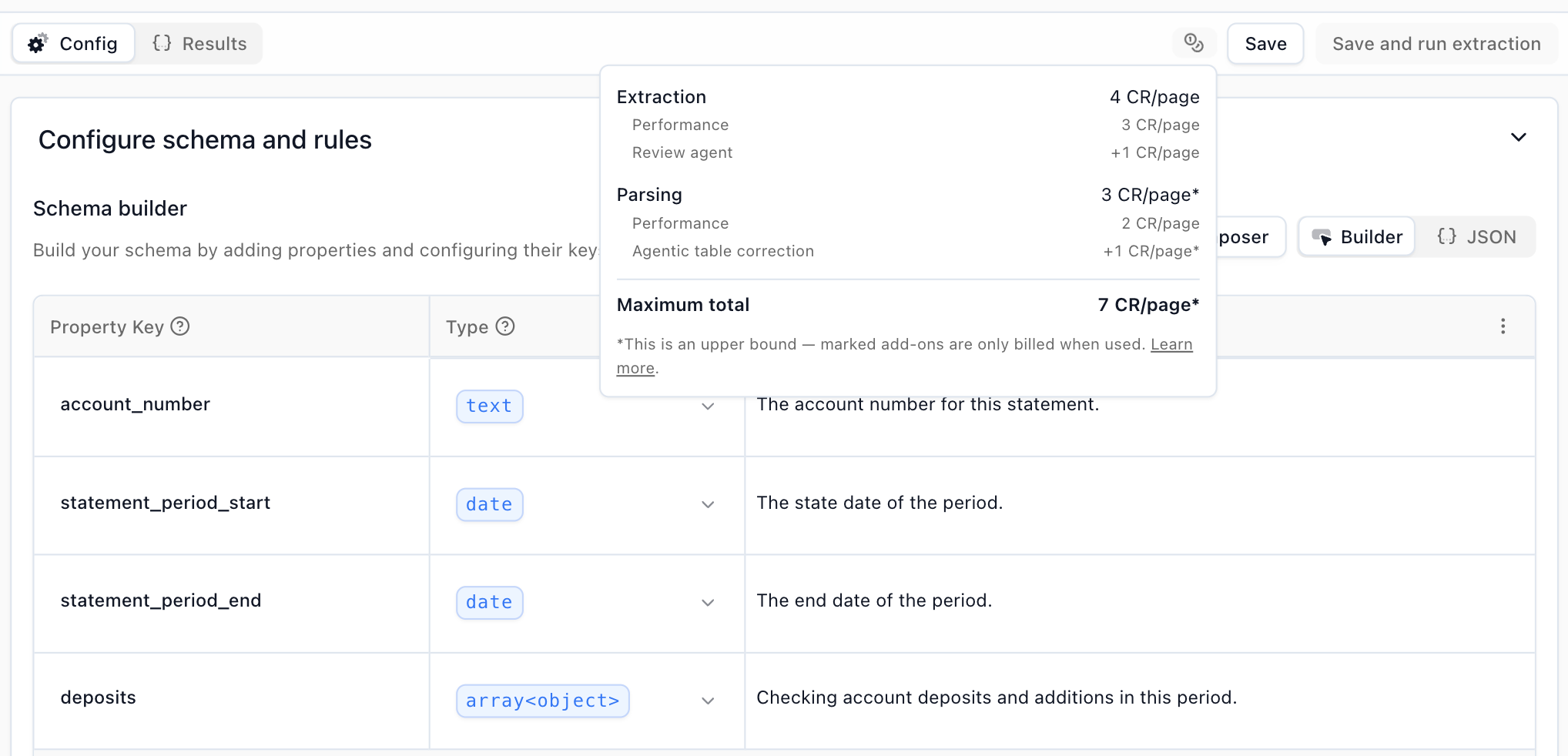
When configuring a processor, the builder displays the per-page credit cost for your current settings — including any surcharges from features like the Review Agent or agentic corrections — so you can see exactly how each option affects pricing before you save.
On a run response (after you run)
Every run response includes a usage object so you can see exactly what drove its cost. usage.credits is the billed amount, usage.totalCredits rolls up any work this run triggered (e.g. parsing kicked off by an extract), and usage.breakdown lists each contributing run. Each breakdown entry can include a charges array that itemizes the credit usage — base processor tier, surcharges like the review agent or agentic corrections, and (for page-scoped add-ons) the exact page numbers that incurred the charge.
For the full shape, see usage on the extract run response.
In the dashboard (over time)
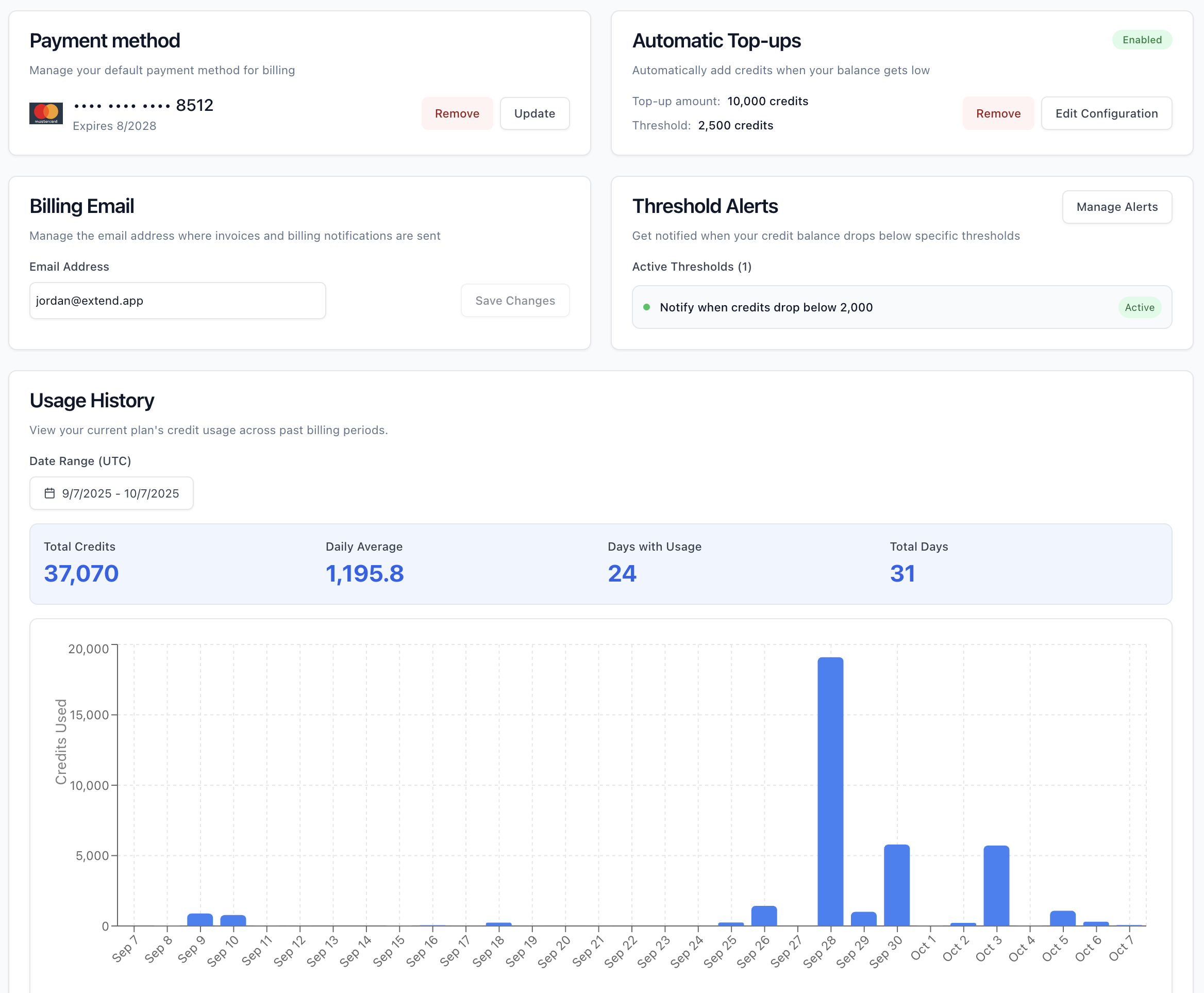
See credit balance and usage trends in real time.
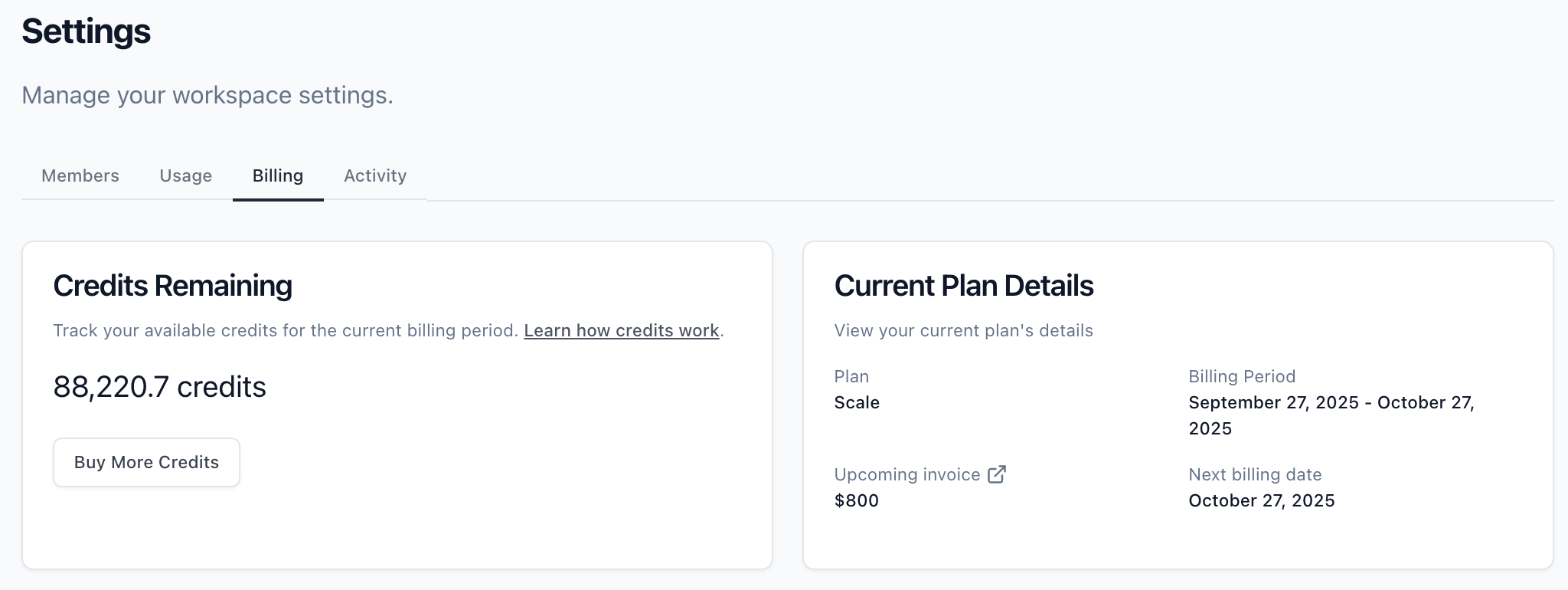
Set low balance notifications and top-up preferences to stay ahead of usage.
Annual plan usage
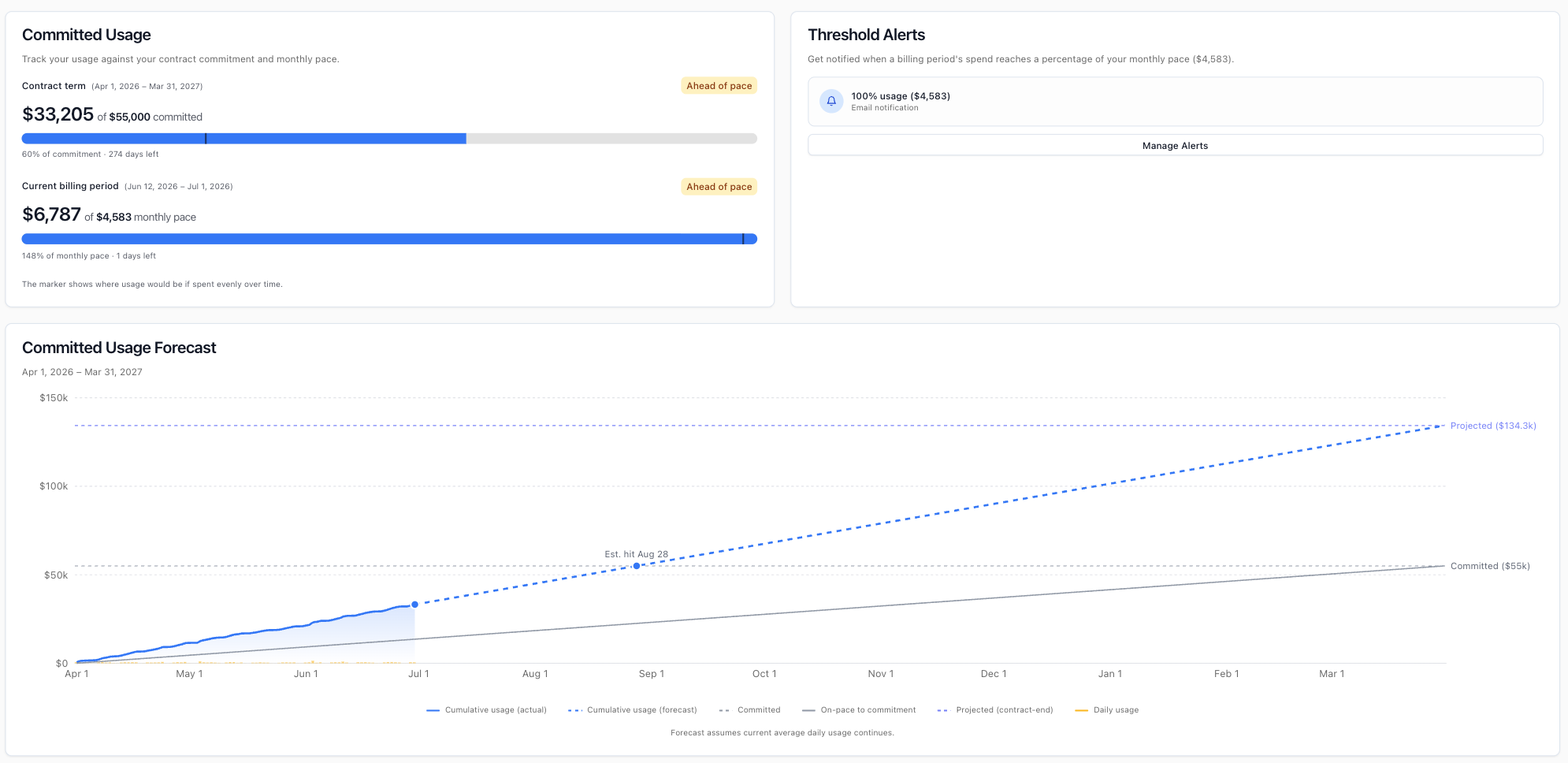
If you’re on an annual plan, the Billing page shows how your usage is tracking against your plan — including usage to date, how much remains, the days left in your term, and a chart of your usage over time. Depending on your plan, usage is shown either in dollars against your annual amount, or in credits remaining against a prepaid balance.
You can also set alerts to be notified when your usage reaches a chosen percentage of your plan.
Customize Your Attributions
You can categorize your workflow, processor, and parser runs for better billing and usage tracking by including usage tags in your run metadata. This allows you to filter and visualize credit usage in the dashboard based on different dimensions like environment, team, or customer.
Adding Usage Tags
Include usage tags in your run metadata using the extend:usage_tags key with an array of string values:
Tag Requirements
Allowed characters: Only alphanumeric characters (a-z, A-Z, 0-9), hyphens (-), and underscores (_)
Removed characters: All special characters and symbols are stripped out, including:
- Spaces
- Punctuation (!, @, #, $, %, ^, &, *, etc.)
- Quotes and brackets
- Any Unicode/emoji characters
Filtering in the Dashboard
The credits dashboard provides multiple filters to help you analyze your usage:
- Usage Tags
- Processors
- Workflows
- API Keys
- Charge Types (File Parsing, Classification, Extraction, Splitting)
You can combine multiple filters to create detailed views of your usage patterns.
You can also group the dashboard by Charge Type, Processor, Workflow, or API Key to see a breakdown of credit usage along that dimension.
Optimizing your Credit Usage
Looking for ways to improve workflow efficiency, or curious if Performance or Light mode is right for you? Book a consultation with the team here!