
Citations

Citations are a way for you to get bounding box references and citation text for every field in your extraction.

You can enable citations in Studio in the Build tab for an extractor config under “Advanced options”. Or via API by setting the citationsEnabled option to true in the extraction config.
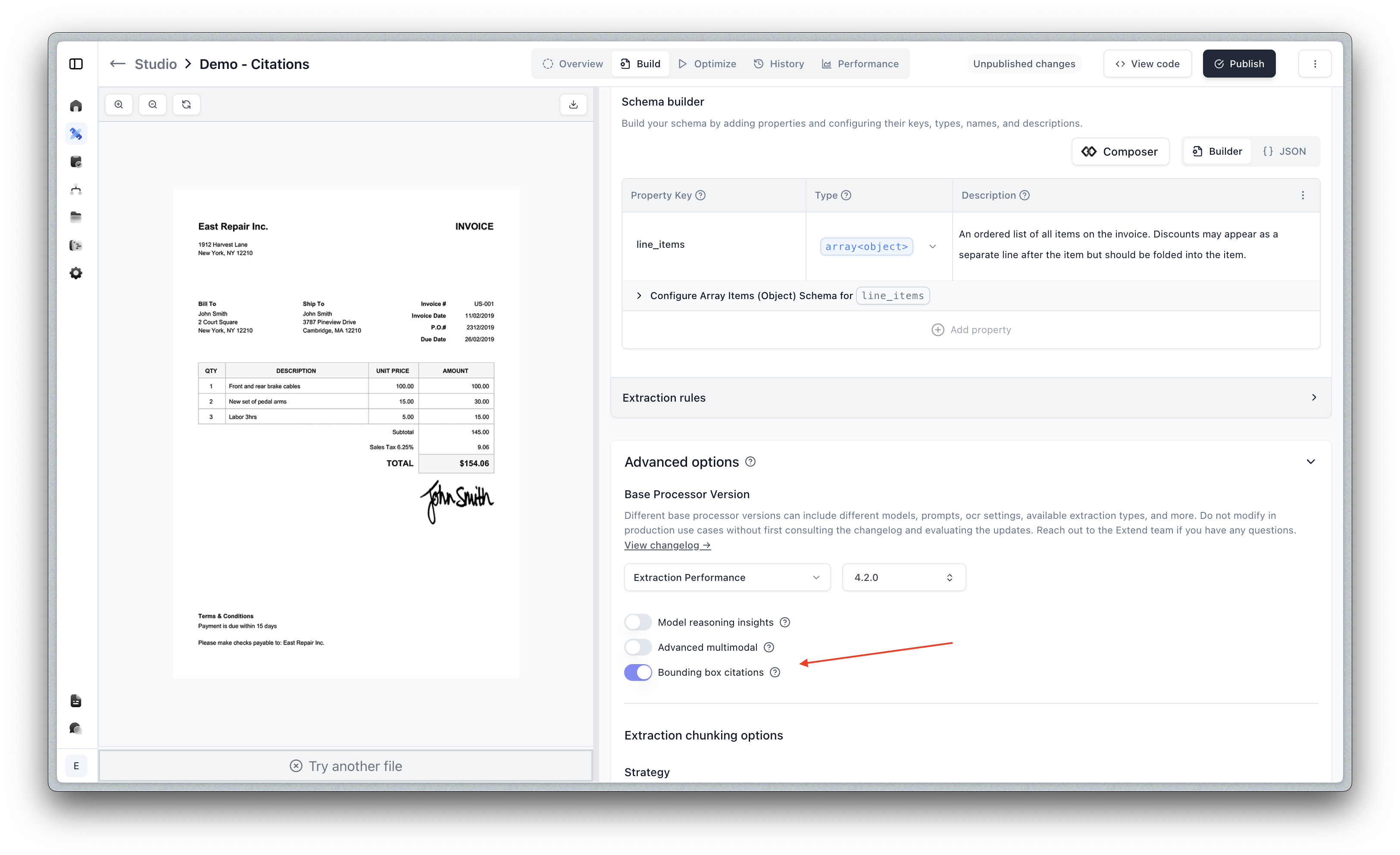
To generate robust and accurate citations, we use an additional citation focused model. As a result, using citations will add a moderate increase in latency on your use case.
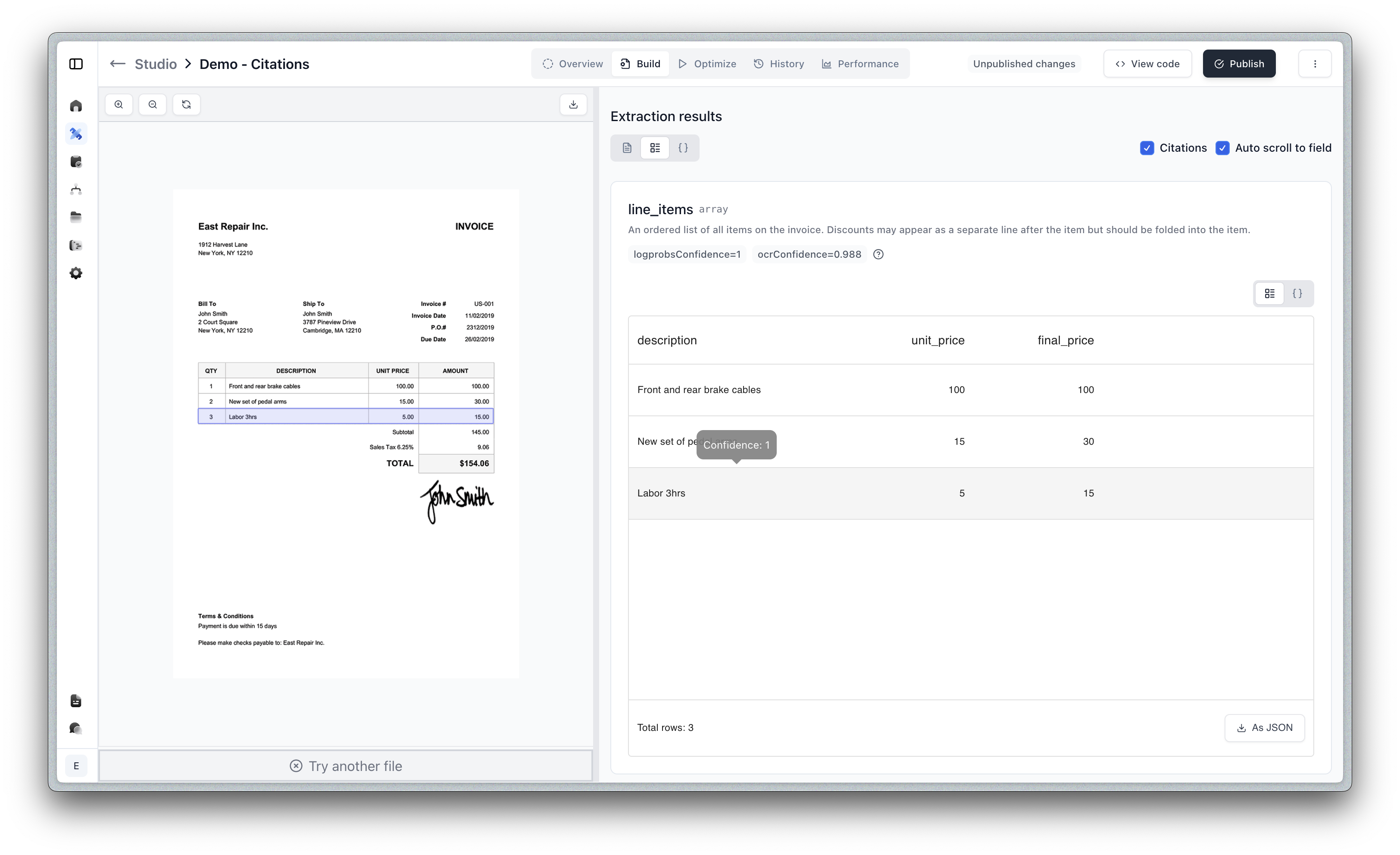
Example

1{
2 "value": {
3 "line_items": [
4 {
5 "unit_price": 100,
6 "description": "Front and rear brake cables",
7 "final_price": 100
8 },
9 {
10 "unit_price": 15,
11 "description": "New set of pedal arms",
12 "final_price": 30
13 },
14 {
15 "unit_price": 5,
16 "description": "Labor 3hrs",
17 "final_price": 15
18 }
19 ],
20 "invoice_number": "US-001"
21 },
22 "metadata": {
23 "invoice_number": {
24 "citations": [
25 {
26 "page": { "number": 1, "width": 612, "height": 792 },
27 "polygon": [
28 {
29 "x": 612,
30 "y": 231
31 },
32 {
33 "x": 706,
34 "y": 231
35 },
36 {
37 "x": 706,
38 "y": 259
39 },
40 {
41 "x": 612,
42 "y": 259
43 }
44 ],
45 "referenceText": "US-001"
46 }
47 ],
48 "ocrConfidence": 0.988,
49 "logprobsConfidence": 1
50 },
51 "line_items[0]": {
52 "citations": [
53 {
54 "page": { "number": 1, "width": 612, "height": 792 },
55 "polygon": [
56 {
57 "x": 54,
58 "y": 410
59 },
60 {
61 "x": 694,
62 "y": 410
63 },
64 {
65 "x": 694,
66 "y": 442
67 },
68 {
69 "x": 54,
70 "y": 442
71 }
72 ],
73 "referenceText": "| 1 | Front and rear brake cables | 100.00 | 100.00 |"
74 }
75 ],
76 "ocrConfidence": 0.991,
77 "logprobsConfidence": 0.562
78 },
79 "line_items[1]": {
80 "citations": [
81 {
82 "page": { "number": 1, "width": 612, "height": 792 },
83 "polygon": [
84 {
85 "x": 54,
86 "y": 442
87 },
88 {
89 "x": 694,
90 "y": 442
91 },
92 {
93 "x": 694,
94 "y": 476
95 },
96 {
97 "x": 54,
98 "y": 476
99 }
100 ],
101 "referenceText": "| 2 | New set of pedal arms | 15.00 | 30.00 |"
102 }
103 ],
104 "ocrConfidence": 0.989,
105 "logprobsConfidence": 1
106 },
107 "line_items[2]": {
108 "citations": [
109 {
110 "page": { "number": 1, "width": 612, "height": 792 },
111 "polygon": [
112 {
113 "x": 54,
114 "y": 475
115 },
116 {
117 "x": 694,
118 "y": 475
119 },
120 {
121 "x": 694,
122 "y": 508
123 },
124 {
125 "x": 54,
126 "y": 508
127 }
128 ],
129 "referenceText": "| 3 | Labor 3hrs | 5.00 | 15.00 |"
130 }
131 ],
132 "ocrConfidence": 0.988,
133 "logprobsConfidence": 1
134 },
135 }
136}

Citations are returned in the metadata object for each field. Learn more about Metadata here.

Citation Schema

The polygon and referenceText fields are only returned if the citationsEnabled option is enabled in the processor config. This can be enabled through the Studio in the Build tab under “Advanced options”.

The shape of the polygon is as follows:

1export type Citation = {
2 page: {
3 number: number;
4 width: number;
5 height: number;
6 };
7 referenceText?: string | null;
8 polygon?: Point[];
9};
10
11type Point = {
12 x: number;
13 y: number;
14};

How to use citations in pdf viewers

How to use the bounding values in order to place a bounding box on a file, depends heavily on the file type. In general though, you will need to take the bounding box values we return and convert them to whatever coordinate system your rendering library uses or what you define if you are using a native Canvas element approach to drawing them over an image for instance.

The values we return in the polygon field represent the coordinates of the bounding box on the image or page. They indicate the points of the polygon that form the bounding box. You may need to convert these values into a format suitable for your rendering library. If your rendering library uses a coordinate system based on percentages of the total image or page size, you would need to perform an additional conversion step.

For PDFs, here is an example of how to apply a transform to the value in order to be rendered using react-pdf-viewer or a similar library. The citation now includes page dimensions (width and height) directly in the page object:

1export type HighlightArea = {
2 left: number;
3 top: number;
4 width: number;
5 height: number;
6 pageIndex: number;
7};
8
9function convertCitationToHighlightArea(citation: Citation): HighlightArea {
10 if (!citation.polygon) {
11 throw new Error("Citation does not have a polygon");
12 }
13
14 const polygon = citation.polygon;
15 // Page dimensions are now available directly from the citation
16 const pageWidth = citation.page.width;
17 const pageHeight = citation.page.height;
18 const pageIndex = citation.page.number - 1; // Convert 1-based to 0-based index
19
20 const boundingBox = polygon.reduce(
21 (acc, curr) => {
22 return {
23 left: Math.min(acc.left, curr.x),
24 top: Math.min(acc.top, curr.y),
25 right: Math.max(acc.right, curr.x),
26 bottom: Math.max(acc.bottom, curr.y),
27 };
28 },
29 { left: Infinity, top: Infinity, right: 0, bottom: 0 }
30 );
31
32 const highlightArea: HighlightArea = {
33 height: ((boundingBox.bottom - boundingBox.top) / pageHeight) * 100 + 2,
34 width: ((boundingBox.right - boundingBox.left) / pageWidth) * 100 + 2,
35 top: (boundingBox.top / pageHeight) * 100 - 1,
36 left: (boundingBox.left / pageWidth) * 100 - 1,
37 pageIndex,
38 };
39 return highlightArea;
40}