

Review Agent
The Review Agent is a specialized system that analyzes extraction results to identify potential issues and produce an intelligent confidence score. It is designed to be a comprehensive replacement for both logprobs and OCR confidence scores, serving as a centralized metric to judge extraction confidence.
The Review Agent is designed to:
- Analyze extraction results for potential issues
- Produce an intelligent confidence score that is superior to standard logprobs and OCR-based scores
- Raise specific issues to help drive review and assist in making corrections
Activating the Review Agent
You can activate the Review Agent in the Advanced settings for your extractor.
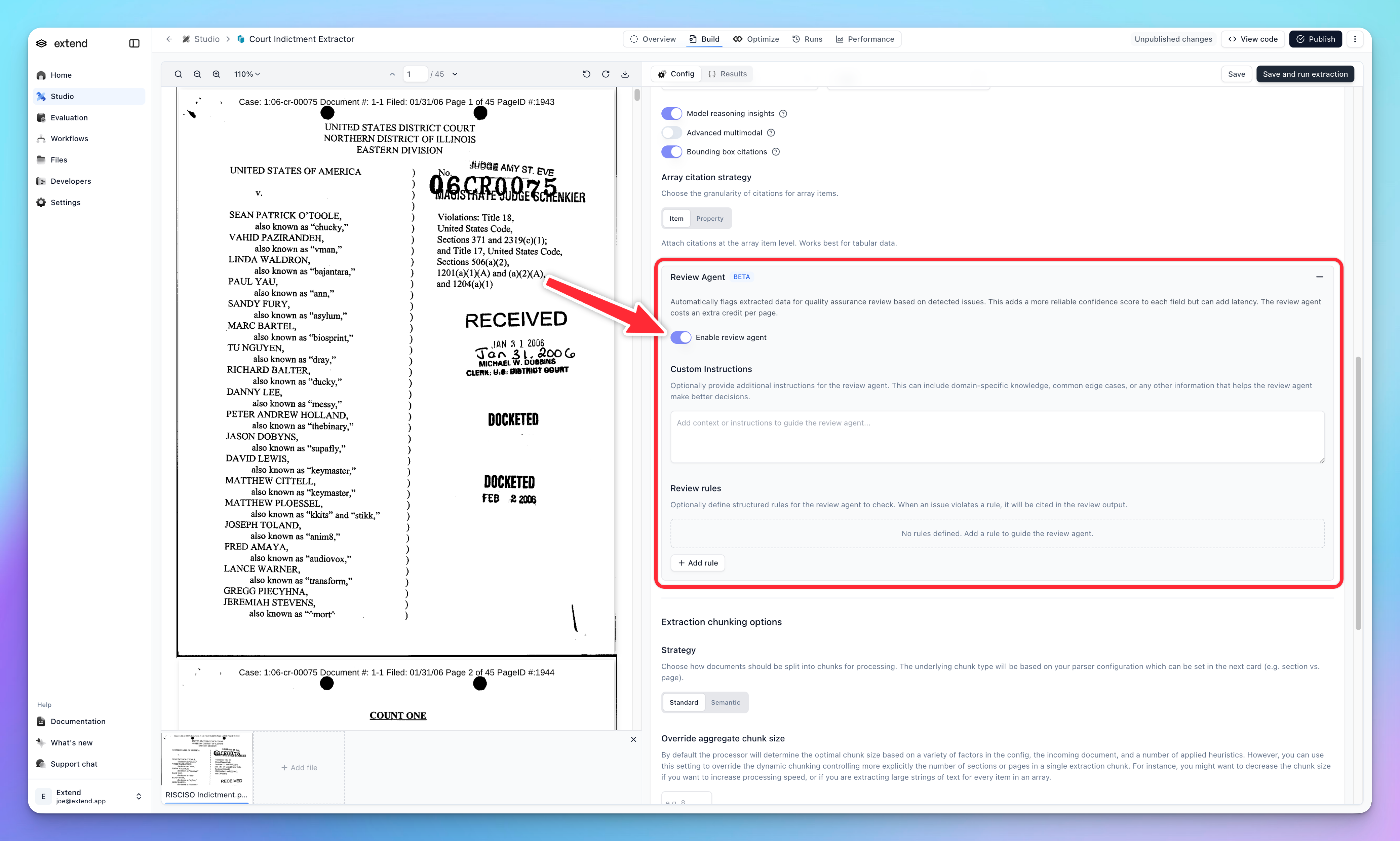
Once activated, the Review Agent will run on all subsequent extractions for this processor, providing review agent scores and issue reports in the extraction results.
Review Agent UI
The Review Agent provides a dedicated interface for reviewing extraction confidence and issues.
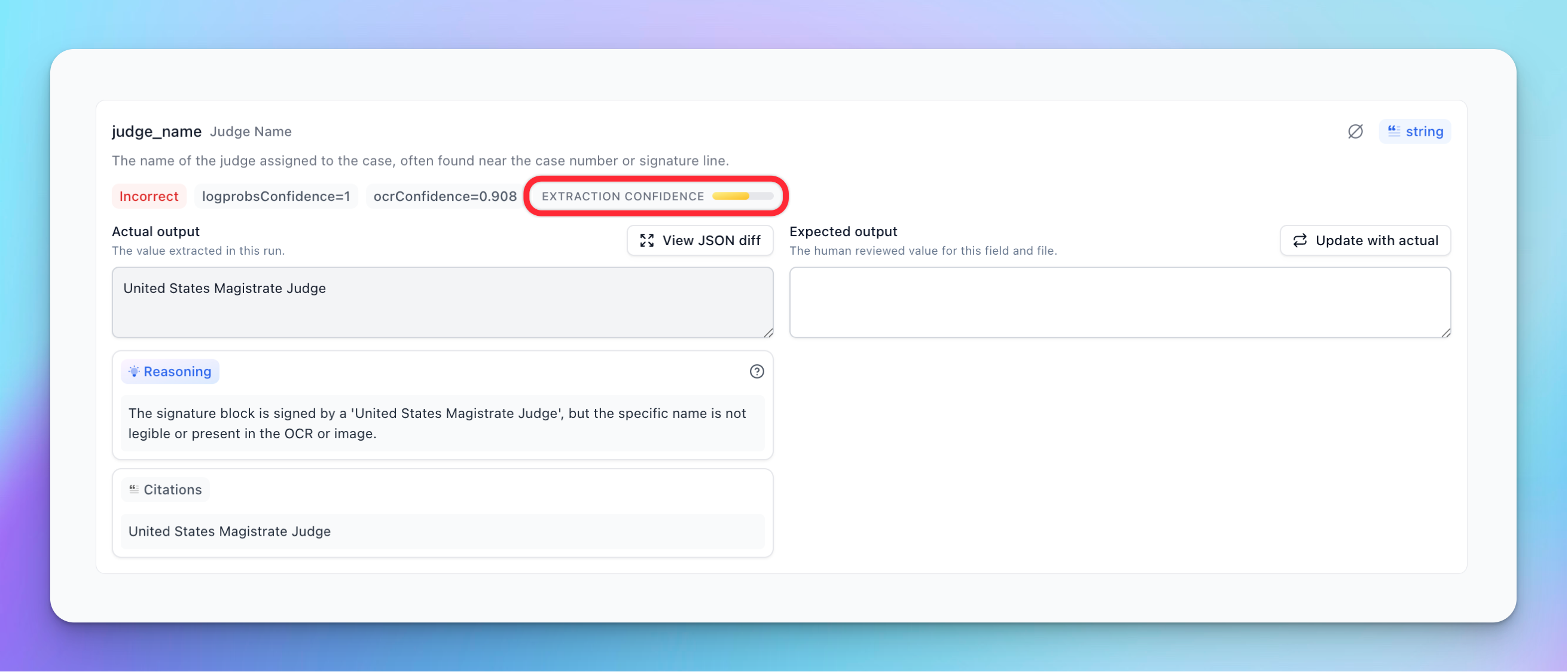
Extraction Confidence Gauge
The extraction confidence gauge gives you a high-level view of the overall confidence for a field. Hovering over the gauge reveals a detailed breakdown of the score and any specific issues found.
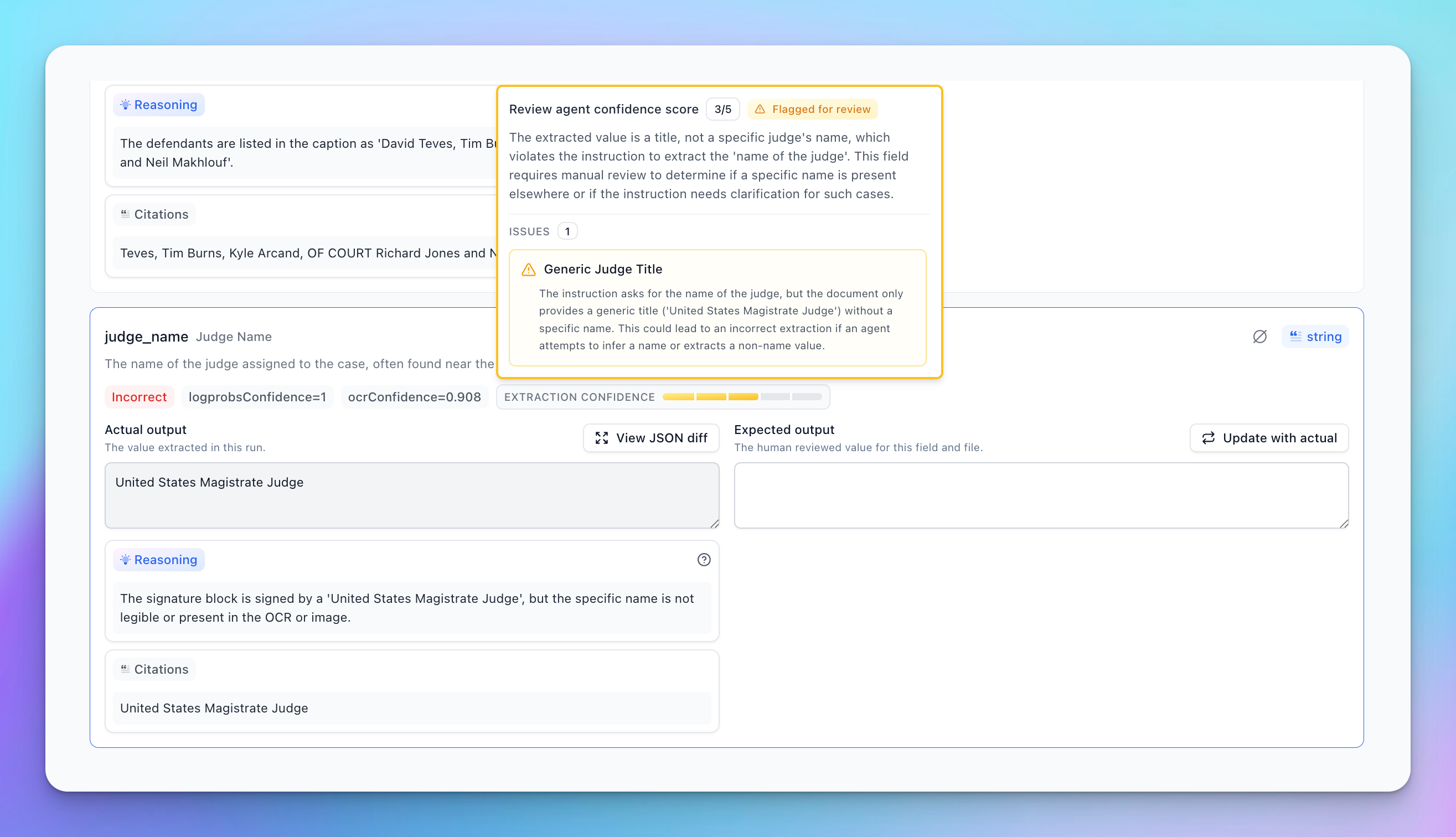
Scalar Fields
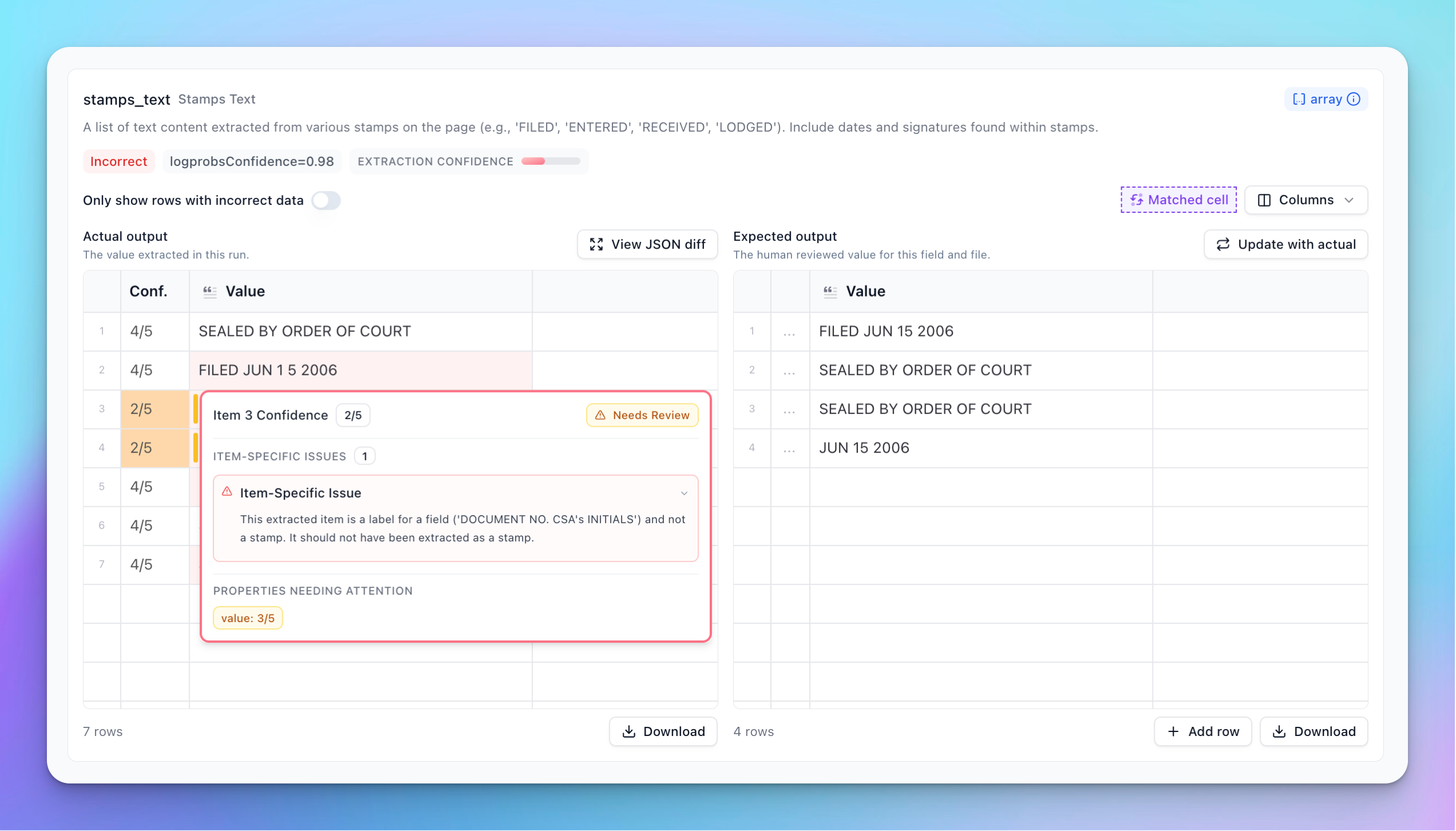
For scalar fields (non-arrays), the interface shows a score and a review indicator. The tooltip expands to show specific issues raised for this item, along with a general review overview for that field.
Array Fields
The array interface provides detailed insights into list-based data. It displays common issues that appear across multiple items and includes a heatmap to help visualize where problems were detected in the extraction.
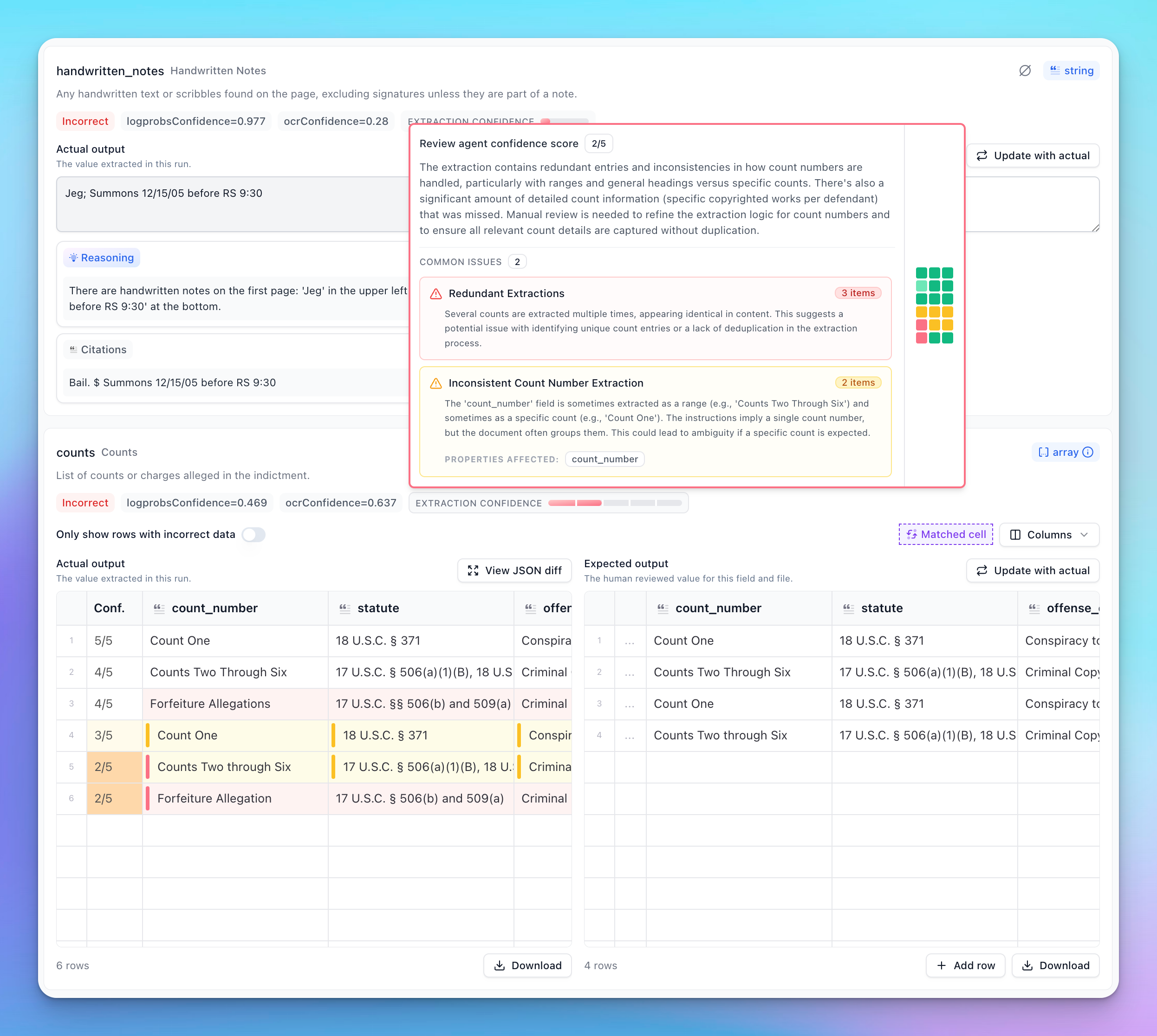
Item-level Scoring: Each item in an array has its own score and issues, and arrays will have a new confidence column generated when running with the review agent enabled.
Hovering over the confidence cell for a specific item displays item-level issues, along with the score for that item. Individual properties within an item also display their own scores when you hover over them. Cells with review scores ≤ 3 display a review indicator bar, helping you quickly identify where problems occur when scrolling through the array results.
Scoring
The Review Agent produces a score that serves as a general indicator of extraction quality.
- Score ≤ 3: Usually warrants a review. The agent has likely found something of concern.
- Score ≤ 4: Consider reviewing if you are extremely sensitive to accuracy.
- Lower Scores: Scores below 3 typically indicate a higher number of major issues or issues of greater severity.
OCR confidence is factored into the Review Agent score. Even if the agent does not identify semantic issues, a low OCR confidence can result in a lower overall score.
Issues
Issues raised by the Review Agent are categorized by severity and relevance.
- Severity Colors: Issues are colored based on their severity.
- Red: Severe problems that likely require attention.
- Yellow: Potentially important problems that still warrant review.
- Grey: Less severe or informational issues.
Minor Issues
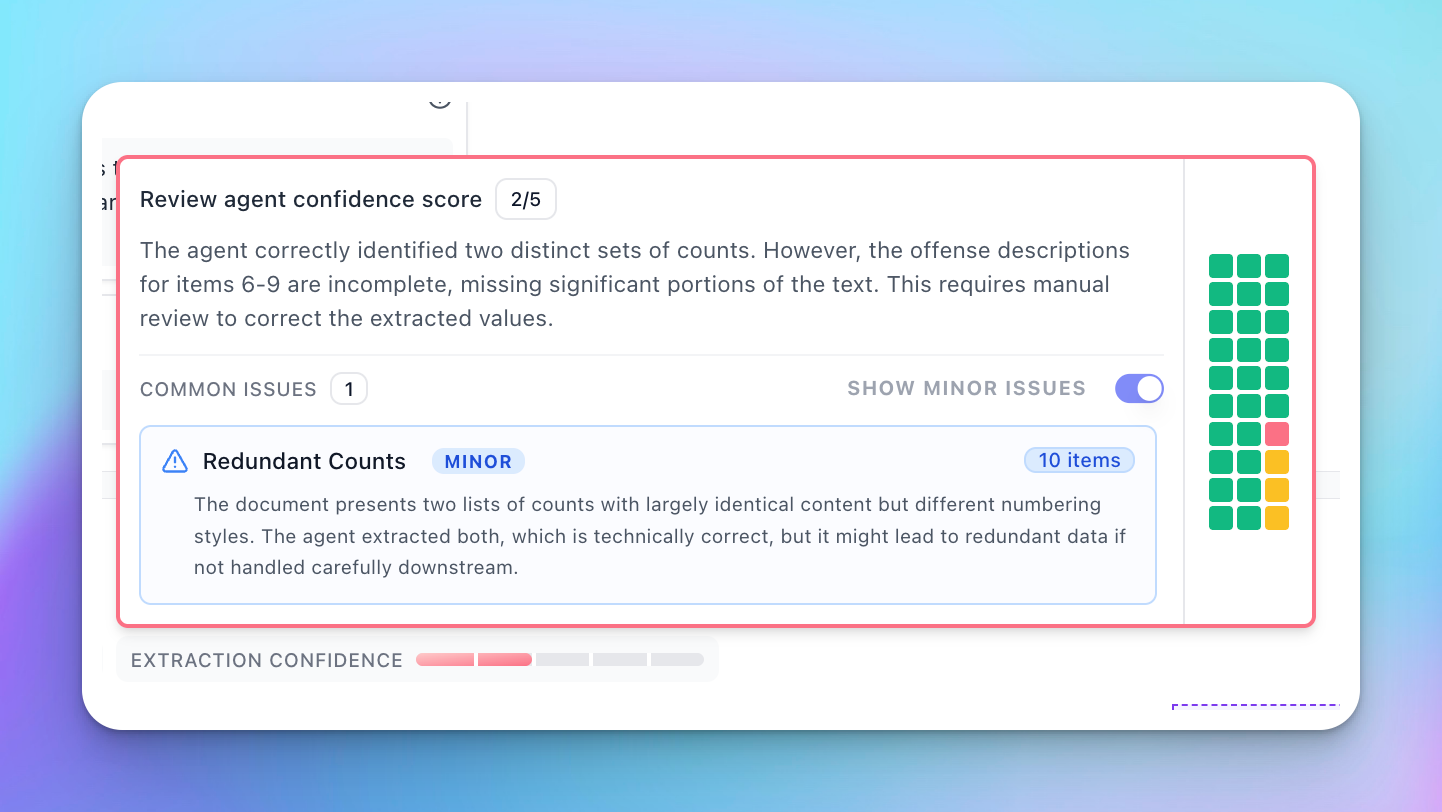
Sometimes the agent produces issues that are determined to be less relevant to the current extraction. These are classified as “Minor Issues” and are:
- Down-weighted in scoring
- Hidden by default in the UI
You can view these by activating the minor issues toggle.
Minor issues are usually precautionary in nature and may not reflect actual errors in the extraction.
Issues for Arrays
Arrays have a hierarchical issue structure:
-
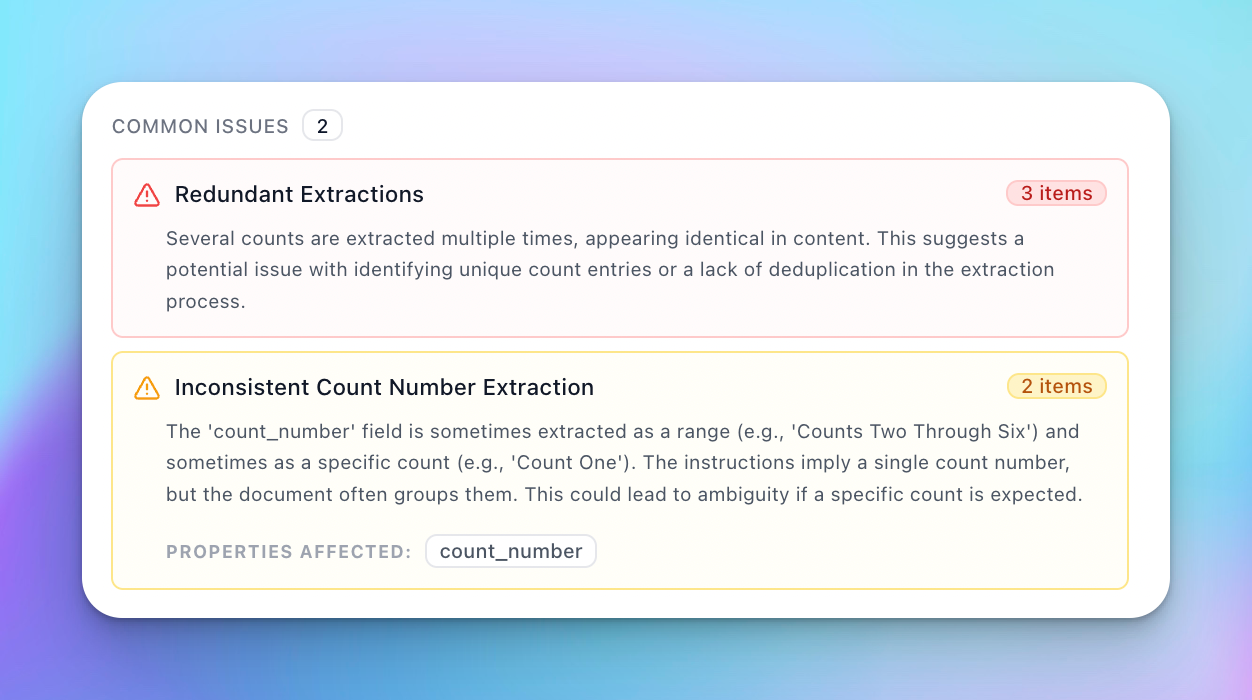
Common Issues: Displayed at the top-level tooltip for the array. These are issues that apply to multiple items in the array.
-
Item-Specific Issues: Targeted issues specific to a single item in the array. These are listed under the item-level review tooltip.
- Item level issues are considered to be property level if they have specific properties affected
Steering the Review Agent
You can guide the Review Agent’s behavior to better suit your specific needs.
Review Agent Instructions
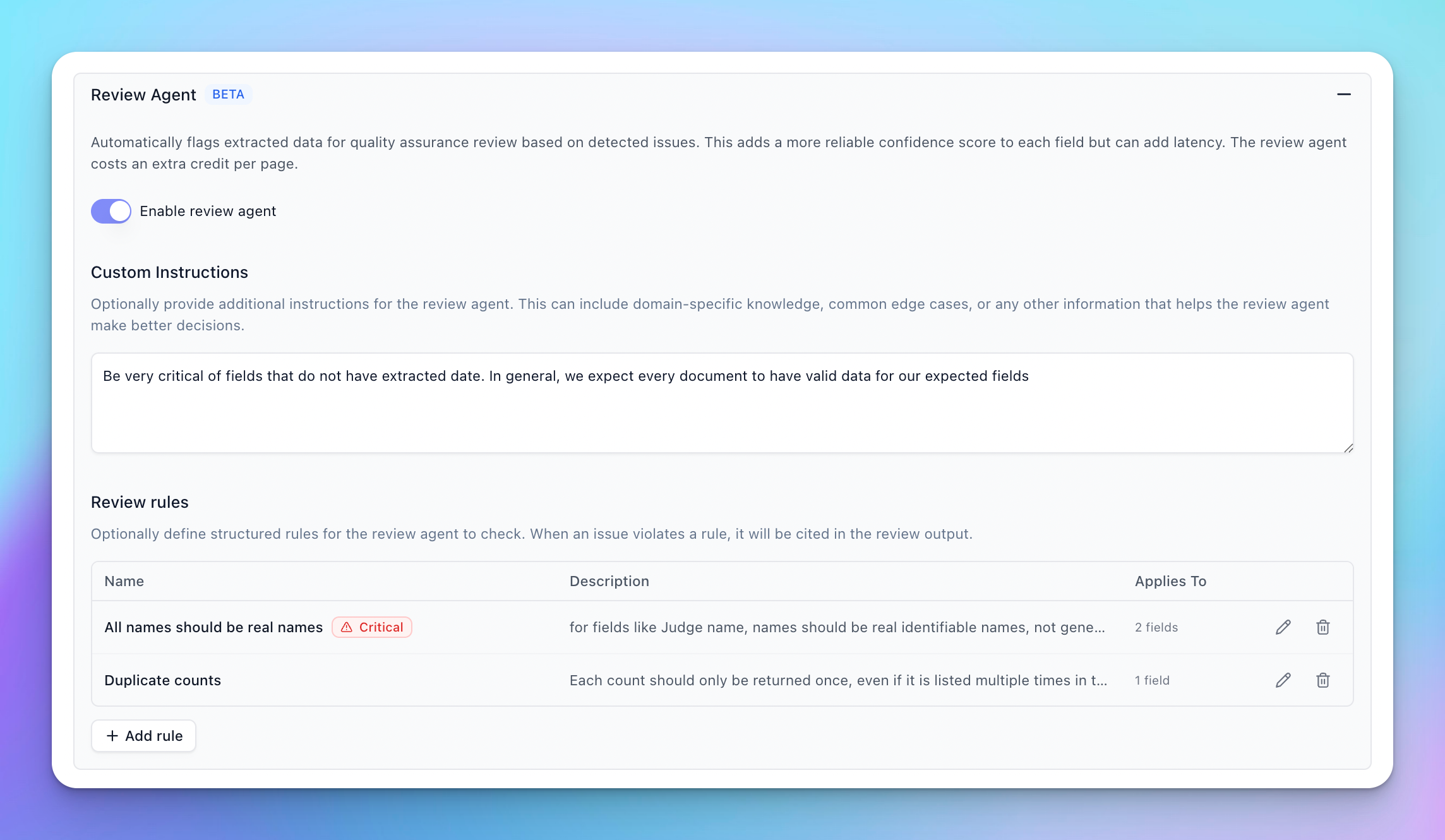
You can add high level instruction to the Review Agent to teach it what to look for or what to ignore. This is useful for directing overall behavior of the review agent.
Review Agent Rules
The review agent also supports structured rules to help drive the scoring of more specific edge cases you may find in your evaluation set. For issues that always require review or rejection of an extraction, you can set a rule to be “critical”. These rules, if broken, will always set the score of the offending element to 1.
Schema Improvements
The Review Agent picks up on ambiguities and issues that often trace back to the extraction schema. Sometimes, clarifying field descriptions or tightening the schema definition is more effective at driving correct Review Agent behavior than adding explicit rules.
Review Agent API
Enabling Review Agent
Review Agent can be enabled for JSON Schema extractors via advancedOptions.reviewAgent.enabled.
Response Structure
The Review Agent adds two main fields to the metadata for each field, array item, and property:
reviewAgentScore: An integer score from 1-5 indicating confidence (ornullwhen Review Agent is enabled but does not return a score for a field).insights: An array of insights. Review Agent contributesissueandreview_summaryinsights, and these may coexist alongsidereasoninginsights (if model reasoning insights are enabled).
Metadata Object
Field Descriptions
reviewAgentScore
A generic confidence score ranging from 1 to 5. When Review Agent is enabled but no score is returned for a field, this value may be null.
- 5: High confidence. No issues detected.
- 4: Good confidence. Minor observations or precautionary notes.
- 3: Moderate confidence. Some uncertainty or potential issues found.
- 2: Low confidence. Likely contains errors or significant ambiguities.
- 1: Very low confidence. Critical issues detected.
insights
A list of insights. Each insight has a type and content.
type: "issue": A specific problem identified by Review Agent.type: "review_summary": A general summary of the review findings from Review Agent for that field.type: "reasoning": Model reasoning about the extraction decision (controlled by model reasoning insights, not Review Agent).
Accessing Review Data
You can access Review Agent data programmatically by traversing the metadata object using standard path notation.
Scalar Fields
For a non-array field like invoice_number, access the metadata directly by key.
Arrays
Arrays have metadata at up to three levels. Note that issues that affect specific items/properties will be distributed to the corresponding item/property keys.
- Array Level:
response.metadata.line_items- Contains the overall
reviewAgentScorefor the array. insightsmay contain thereview_summaryfor the array, and may rarely include issues if an issue applies to the array as a whole.
- Contains the overall
- Item Level:
response.metadata['line_items[0]']- Contains the score for the specific item (or
nullif no score was returned for that item). - Includes item-specific issues and any common issues that do not affect a specific property in the item. Issues at this level apply to the entire item
- Contains the score for the specific item (or
- Property Level:
response.metadata['line_items[0].amount']- Contains the score for the specific property (or
nullif no score was returned for that property). - Includes item-specific issues and common issues that apply to this specific property
- Contains the score for the specific property (or
Code Examples
Collecting All Issues for an Array
To gather all issues across an entire array (including item-level and property-level issues), iterate through all metadata keys that match the array pattern.
Collecting Issues for a Specific Array Item
To collect all issues for a single array item (including its nested properties), filter metadata keys by the specific item index.
Filtering Items by Score Threshold
A common pattern is to identify array items that need human review based on their score.
Using Scores in Workflows
You can use reviewAgentScore in conditional steps to route documents based on quality.
In extend-web, workflow conditions resolve {{ ... }} bindings using a simple dot-path lookup (e.g. {{myStep.output.value.field}}). This works well for scalar fields and array-level metadata keys, but does not support bracket/quoted access for metadata keys like line_items[0] or line_items[0].amount.
If you need coarse routing based on overall extraction quality, the extraction step execution context also exposes summary variables like minReviewAgentScore, avgReviewAgentScore, and numFieldsFlaggedForReview.