

Stay up to date on what’s shipping in the Extend platform.
Multifile evaluation set items
Evaluation sets can now hold multifile items, so you can measure the accuracy of an extractor that runs over a package of files rather than a single document.
fileIdsonPOST /evaluation_sets/{id}/items— pass an ordered array of 2–50 unique file IDs instead offileId. Exactly one offileIdorfileIdsmust be provided per item. Multifile items are only supported on evaluation sets attached to a JSON-schema extractor.filesonEvaluationSetItemandEvaluationSetItemSummary— an ordered array of file summaries, populated for multifile items andnullotherwise.fileis now nullable —nullfor multifile items, matching thefile/filesconvention onExtractRun.
Operator
Operator is now available as a third extraction base processor, extraction_operator. For long, table-heavy documents an extraction agent replaces the chunked pipeline: it plans, extracts repetitive structure programmatically, verifies totals and row counts against the source, and submits a schema-validated result. For other documents, the agent audits and corrects any fields the Review Agent flags with low confidence. Both paths require a single-file JSON Schema extraction.
Strict Identifier Mode for Splitters
Splitters can now merge adjacent sub-documents that share the same extracted identifier into a single split, through the new advancedOptions.strictIdentifierModeEnabled option on the 2026-02-09 API version. Use it when one logical document repeats its identifier across its pages — a multi-page invoice whose invoice number appears on every page, for example — and you want one split per identifier rather than several consecutive splits of the same document.
Parse output metadata: page rotation, original dimensions, and file type
Parse runs now include a metadata object on output, alongside chunks:
originalMimeType/finalMimeType— the file’s media type before and after any format conversion.pages— an array of per-page entries, each with:number— the page number, matchingmetadata.page.numberon that page’s blocks.rotationApplied— degrees Extend rotated the page to make it upright, as a multiple of 90. Positive values are clockwise, negative values are counterclockwise (-90is equivalent to270).0if detection ran and the page was already upright,nullif rotation detection was disabled for the run.originalPageWidth/originalPageHeight— the file’s true page size, independent of rendering resolution.dpi— the DPI thatboundingBox/polygoncoordinates on the page are scaled to; multiply the original dimensions bydpi / 72to bring them into that same coordinate space.
Excel cell metadata and formatting in Parse
Advanced Excel parsing can now preserve source-cell provenance and formatting in parse output.
- Set
advancedOptions.excelIncludeCellMetadatato return source cell references such asB2or merged ranges such asA1:C1; formula cells also include the source formula text. - Set
advancedOptions.excelIncludeCellFormattingto return structured cell formatting such as bold, italic, font color, and background color. - For HTML table output, metadata is also emitted as
data-cellanddata-formulaattributes, and formatting preserves inline cell styles.
Custom instructions for figure parsing
You can now provide custom instructions for figure parsing via blockOptions.figures.customInstructions. The instructions (up to 2,000 characters) are injected into the vision model prompt that analyzes and summarizes each figure, letting you steer descriptions toward your use case — for example, domain-specific terminology or details to always capture from diagrams.
Processor cost preview and charge-level usage breakdown
Run responses now include a finer-grained credit breakdown. Each entry in usage.breakdown can now include a charges array that itemizes the cost drivers behind that run’s credits — for example base processor, review agent, or page-specific add-ons like agentic text correction. Each charge lists the billing product, unit (page or cell), quantity, credits consumed, and applicable page numbers when billing is page-scoped.
Cancel in-flight parse runs
You can now cancel parse runs that are still processing. Call POST /parse_runs/{id}/cancel on the 2026-02-09 API to cancel an in-progress parse run and set its status to CANCELLED. Only runs with status PROCESSING can be cancelled.
POST /parse_runs/{id}/cancel— abort an in-progress parse run (2026-02-09 API)
Validation rules: INCLUDES and INCLUDESANY operators
Workflow validation formulas now support INCLUDES and INCLUDESANY for checking whether text appears inside any element of an array field. Unlike CONTAINS and CONTAINSALL, which match whole array elements, these operators perform case-insensitive substring checks—useful when you need to verify that one or more keywords appear in fields such as line item descriptions.
OCR word confidence on parse chunk and block metadata
Parse runs now include minOcrConfidence and avgOcrConfidence on chunk and block metadata — the minimum and average per-word OCR confidence across the words in that region.
Both fields are returned on every chunk and block, and are null when word-level confidence isn’t produced for that region. Values are in the range 0–1.
Generate extractor JSON schemas via the REST API when you create an extractor
For API version 2026-02-09, you can optionally pass generate on POST /extractors instead of supplying config. Provide one to five sample inputs as Extend file IDs or file URLs and Extend will generate a JSON extraction schema from those examples and return the extractor with the schema applied. Optionally add generate.instructions (up to 2,500 characters) to provide additional context about the document type or requirements for how values should be extracted. You cannot combine generate with cloneExtractorId or config.
Extraction Performance 4.8.0
Extraction Performance 4.8.0 is now the latest base processor version. It upgrades the base models used for core extraction and large array strategies
Include a reference date in extraction prompts
You can opt in to an advanced extraction setting that adds a fixed “current date” line to the system prompt. The model can use it when a field depends on today, relative phrases like “30 days from now”, or ambiguous short dates on the page (for example interpreting 02/03/26). The value is taken from when the run was created in UTC.
The option is off by default. For API version 2026-02-09, set advancedOptions.currentDateEnabled to true. See the JSON Schema extraction guide for how advanced options fit into your setup.
Detailed credit breakdown on run responses
Run objects now include richer usage metadata so you can see how credits relate to underlying work alongside the billed amount (credits). The existing usage.credits value is unchanged. For full run payloads and webhook events, responses can also include totalCredits, representing all contributing charges for that logical run (for example extraction plus parsing when parsing was billed for that run), and a breakdown array listing each contributing resource type, id, and credit amount.
Extraction citation mode control (line, word, block)
When bounding box citations are enabled on an extractor, you can set citationMode in advancedOptions to line, word, or block so citation polygons match the granularity you want. If you leave it unset, behavior matches what you have today (line-based citation processing plus block overlap handling across supported parse engines).
Extraction pipelines that use the parse 2.0.0-beta engine can now return bounding box citations for extracted values, so you are not limited to older parse versions when you need spatial references.
Batch Extract and Batch Parse APIs
Two new endpoints make bulk background processing easier:
/extract/batch— queue thousands of files for extraction in the background without running into rate limits./parse/batch— bulk background parse operations.
Splitter Composer
Composer is now available for splitters, so you can optimize them automatically from eval sets. Previously, Composer was only available for extractors and classifiers.
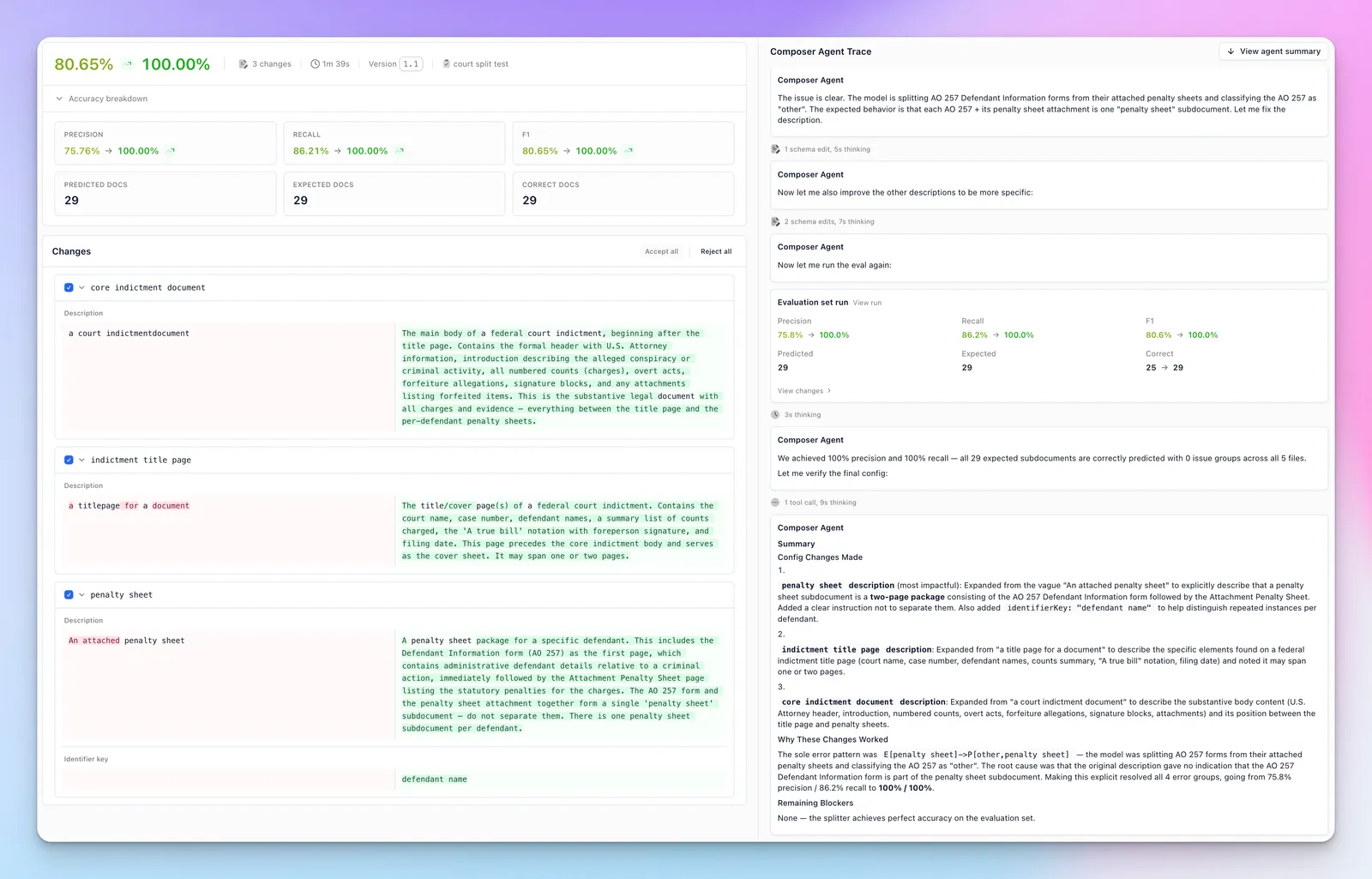
If you’re working on splitting, check out our Splitter Benchmark to see how we evaluate models.
Formula handling in Parse
The new parse engine can now parse formula blocks as LaTeX. Enable it as an advanced option to extract math content directly from documents.
Strikethrough detection in Parse
The new parse engine now detects and annotates strikethrough text via a specialized model. Enable it as an advanced option in the parser config.
Workflows create/update API
You can now create, update, and delete workflows and workflow versions entirely via API. Previously, workflows could only be managed in the Extend dashboard. This makes it easier to generate workflows programmatically, check configs into code, manage them with CI/CD, and build them with agents like Claude Code.