

Confidence Scores
A confidence score tells you how confident the model is in an extracted value, as a number between 0 and 1 (closer to 1 is more confident). Use them to trust high-confidence values automatically and route the rest to human review.
The two scores
Every entry in the output.metadata object can carry two independent scores:
logprobsConfidence is being phased out. The extraction_light processor has never returned it, and extraction_performance version 4.6.0 and later return null. Prefer ocrConfidence and the Review Agent scoring system for new integrations. See Extraction Performance versions.
ocrConfidence is computed as part of citation processing. Set advancedOptions.citationsEnabled: true on the extractor (or in the run config) to include it. With citations disabled, metadata entries will not carry ocrConfidence. See Citations and Configuration.
Accessing confidence scores
Scores live in output.metadata, keyed by path-like notation that mirrors output.value. A root field uses its own name (invoice_number); nested and repeated fields use arrayName[index].propertyName.
Working with arrays
Confidence is reported at every level of an array — the array as a whole, each item, and each property within an item:
Reading scores programmatically
Look up a field’s entry by its path key, then read logprobsConfidence / ocrConfidence.
Python
TypeScript
Java
Go
Routing on confidence in Workflows
In Workflows, conditional steps can branch on an extraction step’s confidence — for example, send low-confidence documents to manual review and auto-process the rest.
Aggregate access:
{{extractionStepName.avgConfidence}}— average across all fields.{{extractionStepName.minConfidence}}— minimum across all fields.
These aggregates summarize the per-field confidence scores described above. On processors where logprobsConfidence is null (such as extraction_performance 4.6.0+ and all of extraction_light), build routing on ocrConfidence (requires citationsEnabled: true) and the Review Agent.
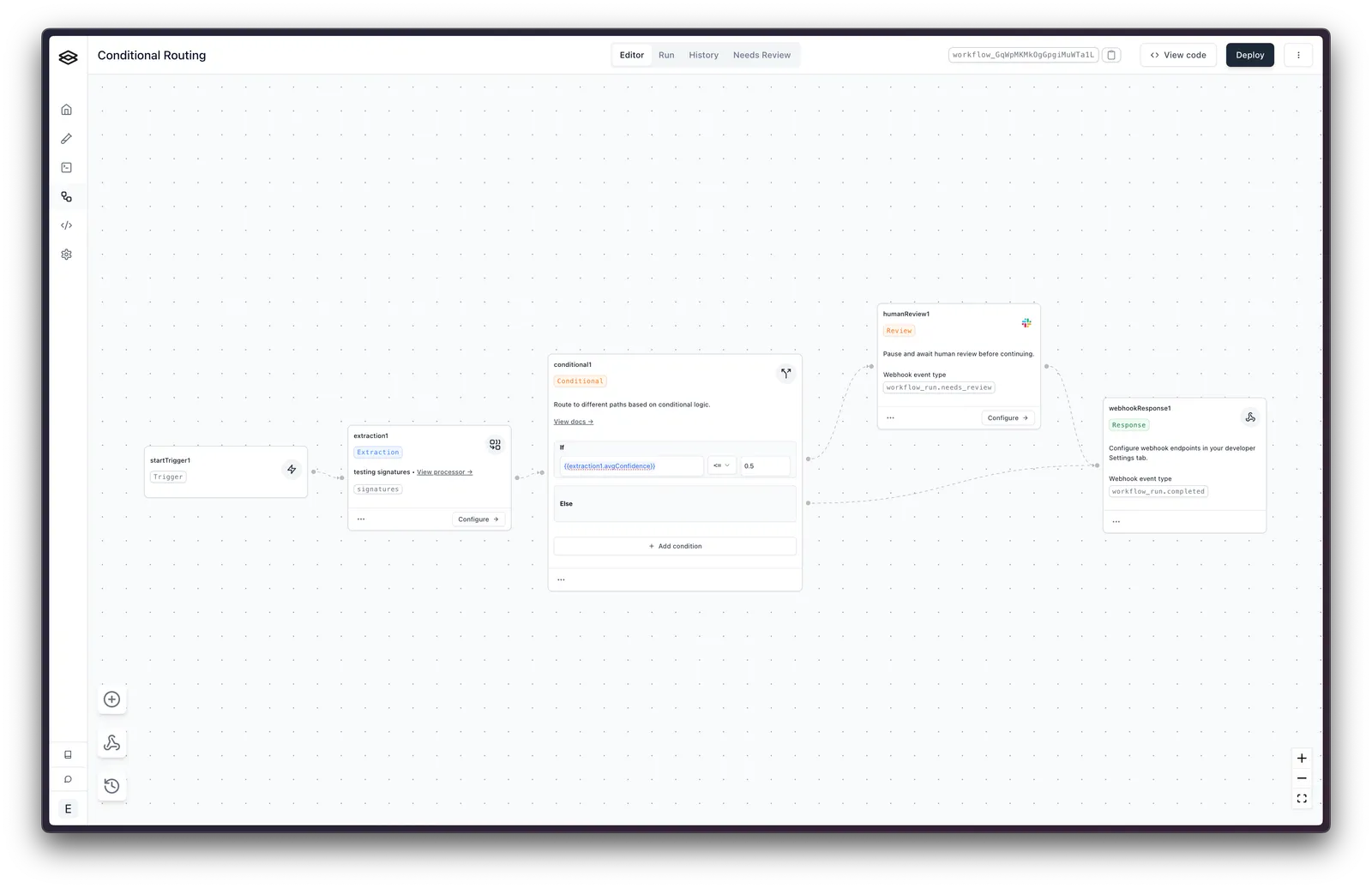
Specific-field access:
{{extractionStepName.output.metadata.field_name.ocrConfidence}}— a field’s OCR confidence. Prefer this for new integrations.{{extractionStepName.output.metadata.field_name.logprobsConfidence}}— a field’s model confidence. Legacy: this isnullonextraction_performance4.6.0+ and is never set onextraction_light(see the phase-out note above), so a condition built on it will silently never fire on current processors.
Example Conditional Logic:
Array and nested-object confidence access (for example line_items[0].description) is not currently supported in conditional steps.
Limitations and best practices
While confidence scores are a valuable tool for assessing the reliability of extracted data, it’s important to recognize their limitations to use them effectively.
Not a guarantee of accuracy
A high confidence score indicates a high probability of correctness, but it doesn’t guarantee accuracy. Even with a high score, there’s always a chance of errors, so critical data should always be cross-verified.
Context matters
Confidence scores are calculated from the model’s understanding of the data. They may not account for nuances or context that a human reviewer who understands your business would recognize. Because of this, it’s imperative to supply sufficient context on the value you want extracted so the model can determine whether it is confident or not.
For example, if you name a field company_name on an extractor designed for invoices, the model may not be confident which name you’re asking for, since there are often a couple of different company names on an invoice.
Best practices
- Provide clear field descriptions. Ambiguous field names lead to lower confidence scores — this is your biggest lever on both accuracy and confidence. See Field Names and Prompt Crafting.
- Test and iterate. Monitor confidence patterns in your specific use case and adjust your review thresholds accordingly.