Skip to navigation

Form Structured Output

Form structured output returns each form region in a document as a tree you can walk in code. Our form and form-controls models work together to pair every printed label with its answer, find each input, checkbox, and signature line (including fields left blank), and locate every one of them on the page. Turn it on with one option. The markdown content of each block doesn’t change; every key_value block gains a details.form tree alongside it.

Use it when you need label/value pairs, checkbox states, or per-field coordinates, for example to map tax or intake forms into your own data model, feed an LLM typed fields instead of markdown, or draw highlights over individual answers.

Requires parse_performance >= 2.0.0. Structured output applies to regions detected as key_value blocks; a box grid that the layout model detects as a table keeps its values in that table block’s content.

Via the API

1

Enable structured output

Set config.blockOptions.keyValue.structuredOutputEnabled to true. It works on the synchronous parse call shown here and on async parse runs.

from extend_ai import Extend
client = Extend()
response = client.parse(
file={"url": "https://example.com/patient-intake.pdf"},
config={
"blockOptions": {
"keyValue": {"structuredOutputEnabled": True},
},
},
)
2

Read the form tree

Each key_value block carries details.form, a list of nodes in reading order. To turn the tree into flat key-value pairs, walk it and join the labels on the way down: every key adds its content to the path, selection_group and table nodes pass through, and every other node is an answer for the current path.

def form_pairs(nodes, path=(), key_box=None):
for node in nodes:
if node.type == "key":
yield from form_pairs(node.children, (*path, node.content), node.bounding_box)
elif node.type in ("selection_group", "table"):
yield from form_pairs(node.children, path, key_box)
else:
yield {
"key": " > ".join(path),
"type": node.type,
"value": node.content,
"selected": node.selected,
"key_box": key_box,
"value_box": node.bounding_box,
}
for chunk in response.output.chunks:
for block in chunk.blocks:
if block.type == "key_value" and block.details.form:
for pair in form_pairs(block.details.form):
value = ("[x]" if pair["selected"] else "[ ]") if pair["type"] == "selection" else pair["value"]
print(f"{pair['key']} ({pair['type']}) = {value}")

For the patient intake form below, this prints:

Patient name (text_field) = Maria L. Gonzalez
Date of birth > Month (text_field) = 04
Date of birth > Day (text_field) = 17
Date of birth > Year (text_field) = 1986
Phone (text_field) = (510) 555-0142
Email (empty_field) = <blank />
1. Do you have any known allergies? > Yes (selection) = [ ]
1. Do you have any known allergies? > No (selection) = [x]
2. Are you currently taking any medications? > Yes (selection) = [x]
2. Are you currently taking any medications? > No (selection) = [ ]
2. Are you currently taking any medications? > If yes, list medications and dosage (text_field) = Lisinopril 10 mg daily
3. Preferred contact method > Phone (selection) = [ ]
3. Preferred contact method > Email (selection) = [ ]
3. Preferred contact method > Text message (selection) = [x]
Insurance provider (text_field) = Blue Shield of California
Member ID (text_field) = XGB884213307
Group number (empty_field) = <blank />
Patient signature (signature_field) =
Date (text_field) = 10/28/2026

Via Extend Studio

In the Parse playground, open the configuration panel and turn on Structured key-value output in the key-value block options. Hover a key-value line in the output to see the boxes for its label and answer. Use View code to copy the matching config JSON.

Node reference

Every node has the same six fields, so you can branch on type without checking which keys are present.

FieldTypeDescription
idstringDeterministic per block and position: the same node in the same block always gets the same id.
typestringWhat the node is (see below).
contentstringThe node’s text. Always set; "" where a node has no text.
boundingBoxobject | nullleft, top, right, bottom in the same coordinate space as the block’s boundingBox. null when the node couldn’t be located.
selectedboolean | nulltrue or false on selection nodes; null on every other type.
childrenarrayChild nodes. Always an array; empty on leaves.
typeWhat it iscontentboundingBox
keyPrinted text: a label, heading, instruction, or option label. Its answers and sub-labels are its children.The textThe text
text_fieldA filled-in answerThe answer, with printed units kept ("25.0000 %")The answer
empty_fieldAn answer slot left empty"<blank />" plus any printed symbol or unit ("$ <blank />")The empty input area
signature_fieldA signatureThe signer’s name if printed, otherwise ""The signature
selection_groupThe options that answer one key""The area around its options and marks
selectionA checkbox, radio button, or circled-option mark""The mark
tableA grid inside the formThe grid as HTMLThe grid

How the tree is shaped:

  • Answers nest under their label. A value is a text_field child of its key. Labels nest too: a section heading or question is a key whose children are the field labels under it (Date of birth > Month > 04).
  • Options are labels with a mark. Each printed option is a key (the option text) whose first child is its selection (the mark). The options for one question sit together in a selection_group. A “check here” box with no printed option text is a bare selection in the group. Multi-select questions have the same shape, with more than one selected: true.
  • Tables are row > column > cell. A table node’s content holds the HTML; its children are row-header key > column-header key > text_field or empty_field. A column header that’s printed once is repeated under each row, with the same box.
  • Coordinates match the block. Boxes use the same units as the block’s boundingBox and metadata.page.width / height; divide by those for page fractions. See Bounding box coordinates.

Examples

The examples below are trimmed from real runs; ids are omitted for brevity.

Patient intake form
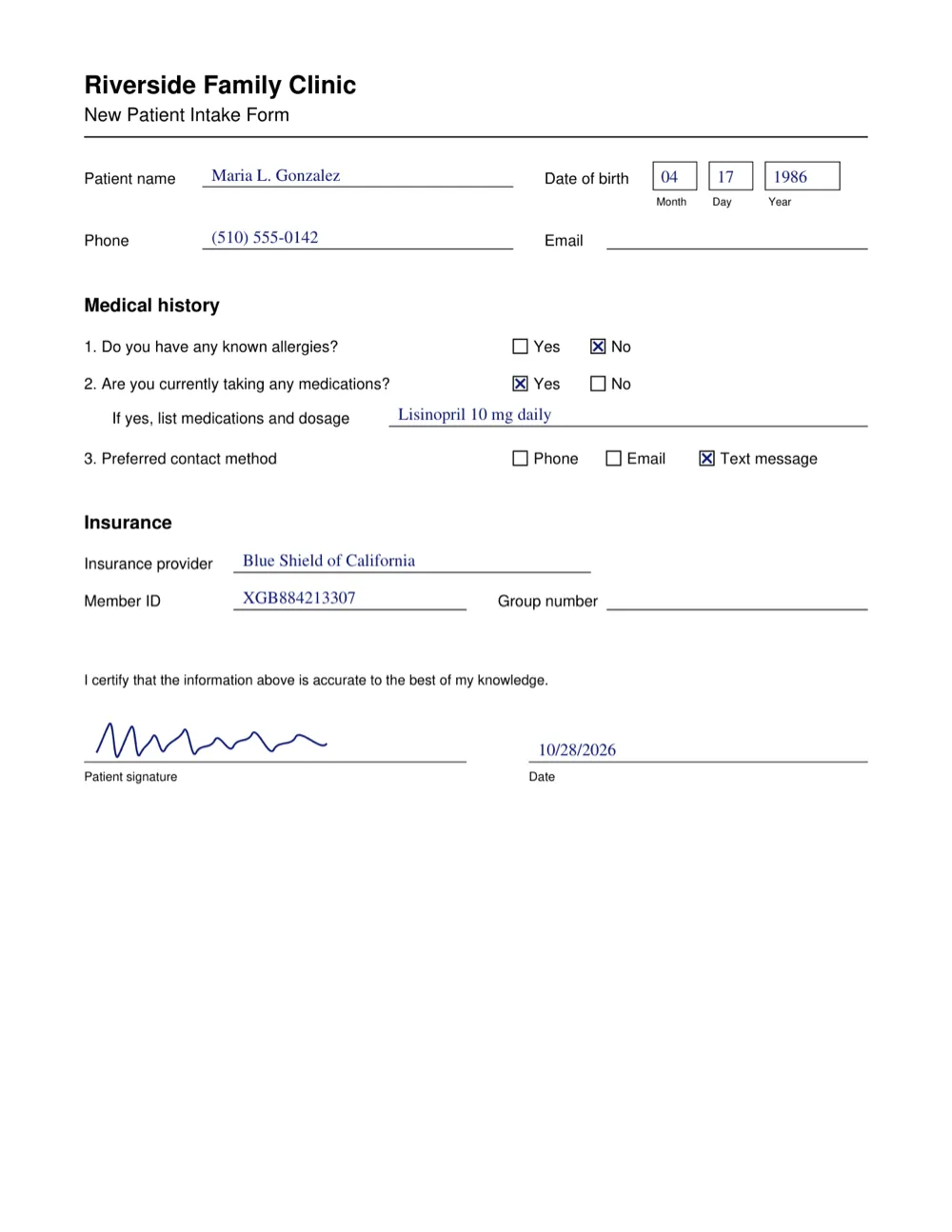
A one-page patient intake form with filled name, date of birth in Month, Day, and Year boxes, phone, an empty email line, three Yes/No and multiple-choice checkbox questions, insurance fields with an empty group number, and a handwritten signature with a date

Values, nested labels, and blanks. The date of birth’s Month, Day, and Year captions are keys under Date of birth, each with its own value. The unfilled email line is an empty_field with the box of the empty input.

[
{ "type": "key", "content": "Patient name", "boundingBox": { "left": 111, "top": 228, "right": 238, "bottom": 249 }, "selected": null, "children": [
{ "type": "text_field", "content": "Maria L. Gonzalez", "boundingBox": { "left": 280, "top": 221, "right": 460, "bottom": 247 }, "selected": null, "children": [] }
] },
{ "type": "key", "content": "Date of birth", "boundingBox": { "left": 728, "top": 228, "right": 845, "bottom": 249 }, "selected": null, "children": [
{ "type": "key", "content": "Month", "boundingBox": { "left": 878, "top": 262, "right": 922, "bottom": 277 }, "selected": null, "children": [
{ "type": "text_field", "content": "04", "boundingBox": { "left": 883, "top": 226, "right": 910, "bottom": 245 }, "selected": null, "children": [] }
] },
{ "type": "key", "content": "Day", "boundingBox": { "left": 953, "top": 262, "right": 982, "bottom": 279 }, "selected": null, "children": [
{ "type": "text_field", "content": "17", "boundingBox": { "left": 961, "top": 225, "right": 986, "bottom": 246 }, "selected": null, "children": [] }
] },
{ "type": "key", "content": "Year", "boundingBox": { "left": 1028, "top": 262, "right": 1061, "bottom": 277 }, "selected": null, "children": [
{ "type": "text_field", "content": "1986", "boundingBox": { "left": 1034, "top": 225, "right": 1082, "bottom": 245 }, "selected": null, "children": [] }
] }
] },
{ "type": "key", "content": "Email", "boundingBox": { "left": 727, "top": 311, "right": 782, "bottom": 332 }, "selected": null, "children": [
{ "type": "empty_field", "content": "<blank />", "boundingBox": { "left": 813, "top": 298, "right": 1164, "bottom": 336 }, "selected": null, "children": [] }
] }
]

A Yes/No question. Each option label is a key with its mark as the first child; the selection box is the checkbox itself, not the label.

{ "type": "key", "content": "1. Do you have any known allergies?", "boundingBox": { "left": 112, "top": 452, "right": 455, "bottom": 477 }, "selected": null, "children": [
{ "type": "selection_group", "content": "", "boundingBox": { "left": 687, "top": 453, "right": 846, "bottom": 474 }, "selected": null, "children": [
{ "type": "key", "content": "Yes", "boundingBox": { "left": 714, "top": 454, "right": 751, "bottom": 472 }, "selected": null, "children": [
{ "type": "selection", "content": "", "boundingBox": { "left": 687, "top": 453, "right": 707, "bottom": 474 }, "selected": false, "children": [] }
] },
{ "type": "key", "content": "No", "boundingBox": { "left": 817, "top": 454, "right": 846, "bottom": 473 }, "selected": null, "children": [
{ "type": "selection", "content": "", "boundingBox": { "left": 791, "top": 453, "right": 811, "bottom": 474 }, "selected": true, "children": [] }
] }
] }
] }

A signature. The signature has no printed name, so content is ""; its box covers the handwritten mark above the caption.

[
{ "type": "key", "content": "Patient signature", "boundingBox": { "left": 111, "top": 1031, "right": 240, "bottom": 1051 }, "selected": null, "children": [
{ "type": "signature_field", "content": "", "boundingBox": { "left": 112, "top": 950, "right": 626, "bottom": 1022 }, "selected": null, "children": [] }
] },
{ "type": "key", "content": "Date", "boundingBox": { "left": 706, "top": 1031, "right": 745, "bottom": 1048 }, "selected": null, "children": [
{ "type": "text_field", "content": "10/28/2026", "boundingBox": { "left": 720, "top": 994, "right": 827, "bottom": 1016 }, "selected": null, "children": [] }
] }
]

Tax form: Schedule K-1 (Form 1065)

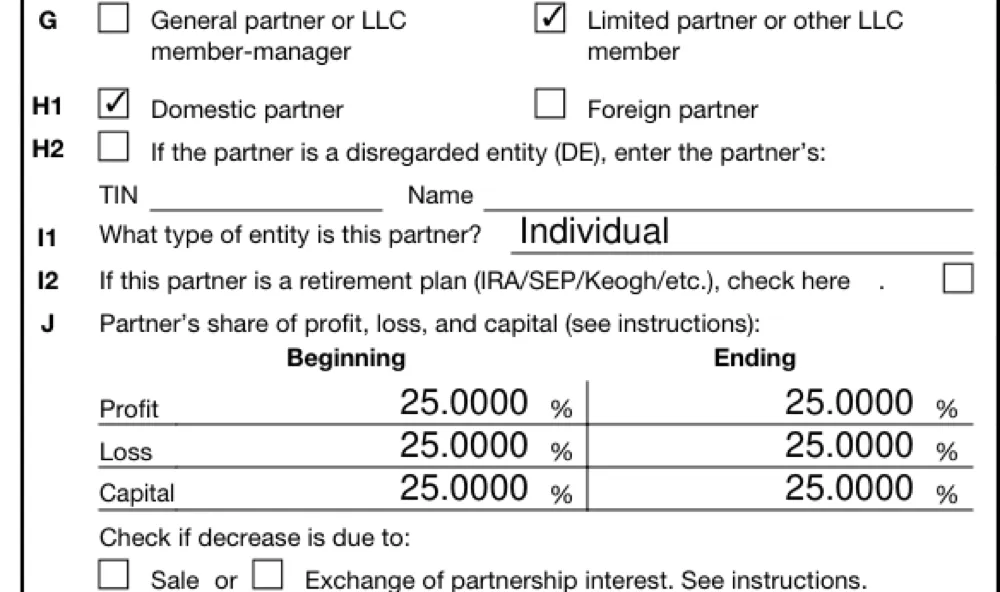
Part II of a filled Schedule K-1 showing item G with Limited partner checked, H1 with Domestic partner checked, an unchecked I2 retirement plan box, and the item J table of profit, loss, and capital percentages

One of several options checked, and a lone “check here” box. Item G’s two options share one selection_group under the G key. Item I2 has no printed option text, so its selection sits directly in the group.

[
{ "type": "key", "content": "G", "boundingBox": { "left": 83, "top": 707, "right": 97, "bottom": 720 }, "selected": null, "children": [
{ "type": "selection_group", "content": "", "boundingBox": { "left": 119, "top": 704, "right": 592, "bottom": 741 }, "selected": null, "children": [
{ "type": "key", "content": "General partner or LLC member-manager", "boundingBox": { "left": 148, "top": 706, "right": 302, "bottom": 741 }, "selected": null, "children": [
{ "type": "selection", "content": "", "boundingBox": { "left": 119, "top": 704, "right": 138, "bottom": 722 }, "selected": false, "children": [] }
] },
{ "type": "key", "content": "Limited partner or other LLC member", "boundingBox": { "left": 403, "top": 707, "right": 592, "bottom": 740 }, "selected": null, "children": [
{ "type": "selection", "content": "", "boundingBox": { "left": 374, "top": 704, "right": 392, "bottom": 722 }, "selected": true, "children": [] }
] }
] }
] },
{ "type": "key", "content": "I2 If this partner is a retirement plan (IRA/SEP/Keogh/etc.), check here .", "boundingBox": { "left": 82, "top": 858, "right": 559, "bottom": 875 }, "selected": null, "children": [
{ "type": "selection_group", "content": "", "boundingBox": { "left": 612, "top": 856, "right": 631, "bottom": 874 }, "selected": null, "children": [
{ "type": "selection", "content": "", "boundingBox": { "left": 612, "top": 856, "right": 631, "bottom": 874 }, "selected": false, "children": [] }
] }
] }
]

A table inside the form. Item J’s grid is a table node. Its children are row > column > cell, so each percentage flattens to a path like J … > Profit > Beginning = 25.0000 %. The Loss and Capital rows (trimmed here) have the same shape.

{ "type": "key", "content": "J Partner's share of profit, loss, and capital (see instructions):", "boundingBox": { "left": 84, "top": 883, "right": 507, "bottom": 900 }, "selected": null, "children": [
{ "type": "table", "content": "<table><tr><th></th><th>Beginning</th><th>Ending</th></tr><tr><td>Profit</td><td>25.0000 %</td><td>25.0000 %</td></tr><tr><td>Loss</td><td>25.0000 %</td><td>25.0000 %</td></tr><tr><td>Capital</td><td>25.0000 %</td><td>25.0000 %</td></tr></table>", "boundingBox": { "left": 118, "top": 903, "right": 597, "bottom": 999 }, "selected": null, "children": [
{ "type": "key", "content": "Profit", "boundingBox": { "left": 118, "top": 934, "right": 156, "bottom": 948 }, "selected": null, "children": [
{ "type": "key", "content": "Beginning", "boundingBox": { "left": 228, "top": 903, "right": 301, "bottom": 921 }, "selected": null, "children": [
{ "type": "text_field", "content": "25.0000 %", "boundingBox": { "left": 295, "top": 927, "right": 372, "bottom": 947 }, "selected": null, "children": [] }
] },
{ "type": "key", "content": "Ending", "boundingBox": { "left": 477, "top": 904, "right": 529, "bottom": 920 }, "selected": null, "children": [
{ "type": "text_field", "content": "25.0000 %", "boundingBox": { "left": 519, "top": 927, "right": 597, "bottom": 947 }, "selected": null, "children": [] }
] }
] }
] }
] }

Empty cells keep their printed units. Item K1’s unfilled liability amounts come back as { "type": "empty_field", "content": "$ <blank />" } under their row and column keys.

Reference